
 Lattia
Custom Email Domains
Send emails from your own domain with verified DKIM authentication. Build trust with supporters by sending from an address they recognize.
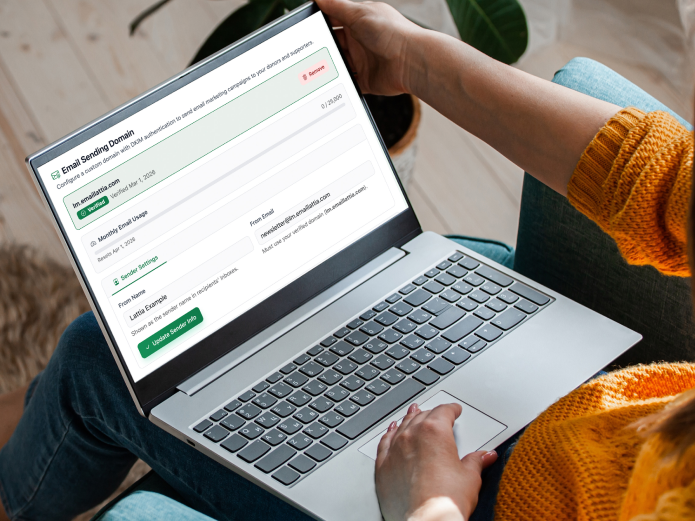
Send from an address your supporters recognize
By default, emails sent through Lattia come from a shared sending address. That works,
but it doesn't build the same trust as an email from updates@lm.yourchurch.org.
Custom email domains let your emails come from your own branded address — so when a
supporter sees your newsletter in their inbox, they know it's from you before they even
open it.
Domain setup takes about five minutes. Enter your subdomain (like lm.yourorg.com),
and Lattia generates the DNS records you need to add. Once verified, every email you send
goes out from your custom address automatically.
Why a subdomain?
Lattia requires a subdomain (like lm.) rather than your root domain for a
practical reason: most organizations already use their root domain for email through
Google Workspace, Microsoft 365, or another provider. Adding Lattia's sending records
directly to your root domain could conflict with those existing services and break your
regular email. A dedicated subdomain keeps everything isolated and safe.
Your regular email is untouched. Adding lm.yourorg.com
has zero effect on you@yourorg.com. Your Google Workspace, Outlook, or
other email service continues working exactly as before.
DKIM verification
When you add a custom domain, Lattia registers it with Amazon SES and generates DKIM (DomainKeys Identified Mail) records. These are DNS TXT records that prove to receiving mail servers that your emails are legitimately sent by your organization — not spoofed by someone else. Proper DKIM setup is one of the most important factors in email deliverability.
Lattia shows you exactly which DNS records to add, checks their status, and confirms when verification is complete. No guesswork about whether your DNS is configured correctly — the system tells you.
DKIM authentication
Cryptographic proof that your emails are legitimate. Improves deliverability and prevents spoofing.
Verification status
Real-time confirmation of your DNS records. Lattia checks and tells you when everything is verified.
One domain per organization
Each organization gets one custom sending domain. This keeps things simple and ensures consistent branding across all your email campaigns. If you need to change domains later, remove the existing one and add the new one — the verification process takes the same five minutes.
Required before sending
A verified custom domain is required before you can send email campaigns through Lattia. This isn't a restriction — it's a quality gate. Organizations that send from verified domains have dramatically better inbox placement, and it protects the deliverability reputation for every organization on the platform. The setup is fast, and the payoff is emails that actually reach your supporters.
Ready to get started?
Create your free account in under 2 minutes. No credit card required.
Sign Up Free